For construction
The job remembers what was agreed.
Payment terms, dates, instructions and certificates, read out of the documents that state them — so nobody retypes a programme date, the certificate gets chased before it lapses, and the argument at month nine is a document rather than a recollection.
Where it earns its place on a site
Six things that go wrong on every job, and what a record with receipts does about each one.
Payment terms that do not drift
An invoice arrives at Net-14 against a contract at Net-30. Memry raises the disagreement with both documents attached instead of quietly taking the newer number.
Certificates before they lapse
An insurance certificate or an accreditation that expires mid-programme is on the watch list weeks out, not discovered by an inspector.
Instructions in writing
A variation agreed in an email thread becomes a record with the sentence that agreed it, attached to the project and to the person who said it.
Dates that never move silently
A starter rule flags a task the day it goes past its due date, and flags any deadline that moves outward the moment it moves.
Subcontractors you can size up
Whose programme dates held and whose slipped, taken from their own past estimates rather than from an impression — and marked as unknown where there is no history yet.
Handover without an archaeology dig
Snagging items, sign-offs and the paper behind them are already in one place, because they were filed as they arrived.
The case everyone recognises
Subcontract applications are paid Net-30 from the date of your payment notice. A supplier invoice turns up with a shorter term on it.
In most systems the newer document wins, because taking the latest value is the easy thing to do and it never looks like a failure. Nine months later somebody is reading two contradictory records and cannot tell which one the company actually agreed to.
Memry does not save the newcomer over the locked term. It parks it, marks the work blocked, and puts both in front of a person with each one's source attached — the payment-terms policy on one side, the supplier's invoice on the other. You settle it, and the reason goes into the record with the answer.
The demo has eight of these open, and payment terms are one of them. It is not staged for the tour — the seeded documents genuinely disagree, the way a real job's do.
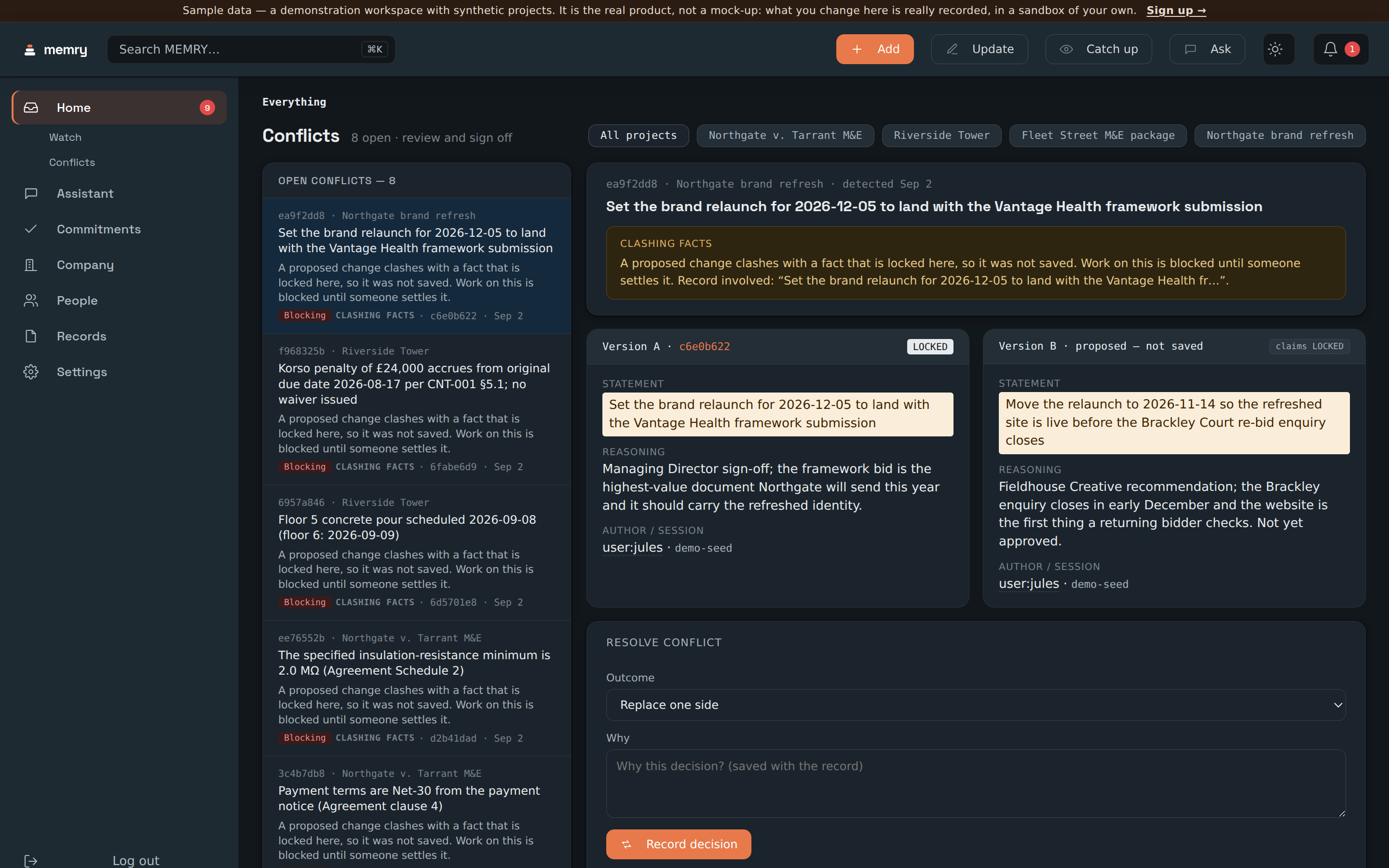 From the demo company
The same mechanism on a programme date: the locked pour date, the site report that would have overwritten it, and the form to settle it.
What is there on day one
Pick Construction at signup and the company is scaffolded around the way construction work actually runs. Rename any of it, remove what does not fit, or accept it as it stands.
Four project typesBuilt
Each arrives with the stages and the prep work that type of job actually needs, rather than an empty board you have to design first.
- New build
- Renovation / fit-out
- Tender / bid
- Snagging / handover
Template keys: new-build, renovation-fitout, tender-bid, snagging-handover.
The people on a jobBuilt
The roster arrives with the roles a construction company works through, inside and outside the business, so the first import has somewhere to land.
- Site manager
- Quantity surveyor
- Subcontractor
- Client
- Inspector/Certifier
- Supplier
Rename any of them, add your own, and Memry keeps the ones you use.
A starting structure for the business itself is scaffolded too, and Memry asks you to accept, rename or remove it before it counts as yours. It is a suggestion, not a model you have to live inside.
Rules that are on before you configure anything
Two starter rules are seeded with the company. Neither one needs a model key, and both can be turned off in a click.
Flag overdue tasks
An overdue task on site is penalty-adjacent, so it is flagged for review the day it goes past its date — not at the next progress meeting.
Flag slipped deadlines
A moved date on site is never silent. When a due date moves outward, the change is raised rather than absorbed, and the old date stays on the record.
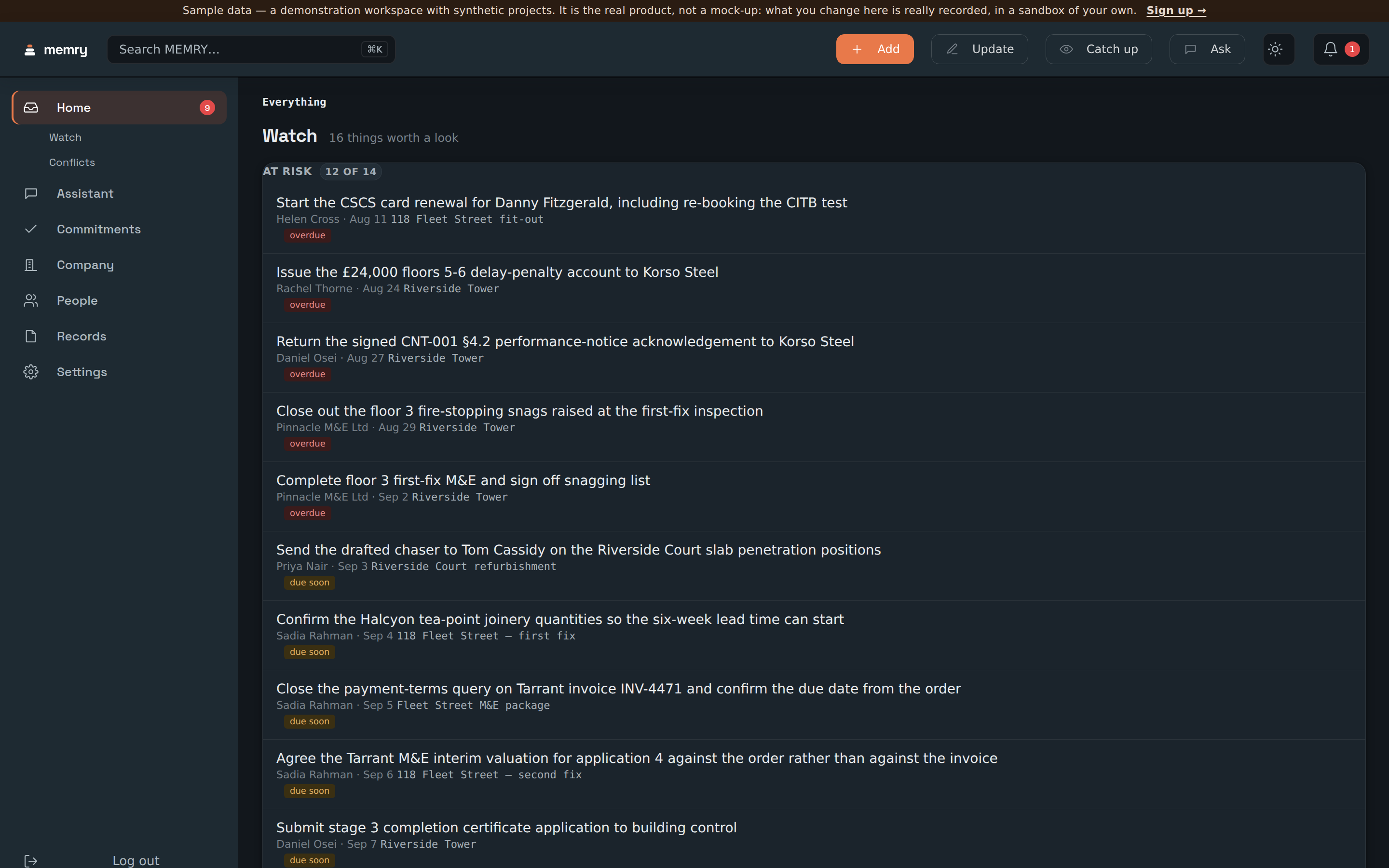 From the demo company
The watch list, ranked: what is overdue, who owes it, and where a track record exists, what it says.
The month-nine argument, and the handover
The two moments a construction record is actually tested.
When a claim lands
Every fact keeps the document and the passage it came from, so “what did we agree” is a click rather than a fortnight in a shared drive. You can follow the number back to the sentence, and the trail says who approved it and when.
When a variation is disputed
A variation agreed in a thread is a record with its own quoted sentence, attached to the project and the person. If a later document contradicts it, that contradiction was raised at the time and settled by somebody, with the reason attached.
When somebody leaves mid-job
What they were holding is already written down — the open promises, the dates they called, the documents behind them. The handover is a list you can read rather than a conversation you hope was complete.
When the job closes
Snagging, sign-offs and the paper behind them are in one place because they were filed as they arrived, and the whole trail exports as CSV or JSON without asking anybody.
A fit-out contractor's company, running
Walk a real job.
Sixty-odd people and firms, a portfolio of live projects, dozens of documents with real bodies in them, and eight things already going wrong. Yours to drive like a real account — approve, resolve, upload, add.
Explore the demo → No account. No invite code. Nothing to install.