memry
Sign in Open the demo

How it works

It notices. It proposes.
You approve. It remembers.

Four steps, one loop, running quietly behind the ordinary work of the day. Here it is in full — including the parts most tools do not talk about.

The loop, in four steps

Nothing here needs configuring before it starts. The loop is running on the demo company the moment you open it.

Step one

It notices

A contract arrives. An email says the survey slipped to Friday. An invoice lands with different payment terms from the one before it. Memry reads what comes in and picks out the things that carry an obligation: a promise, a deadline, a decision, a number.

You do not tag anything, fill in a form, or remember to file it. The work of noticing is the part people are worst at, and it is the part that gets done first.

Step two

It proposes

Nothing is recorded behind your back. Memry puts what it found in a queue, one line each, and every line quotes the sentence it came from: “…practical completion no later than 30 November…”. You read the quote, not a summary of the quote.

If two sources disagree, it says so instead of choosing. An invoice at Net-14 against a contract at Net-30 is a question for you, not a value to overwrite.

Step three

You approve

Tick the ones that are right. Correct the ones that are nearly right. Decline the rest, and say why if you want to. Every row carries the same four choices — approve, edit and approve, decline, or ask a question about it first.

Approving a batch takes seconds because the hard part is already done. Nothing enters the company's memory without a person saying yes.

Step four

It acts, and it remembers

The approved facts become the company's record — tasks with owners and dates, money against projects, promises against people. Rules you turned on act on them straight away: an overdue task gets flagged, a deadline that moves out never moves silently.

And it stays. Months later the record still knows which document said it, who approved it, and when.

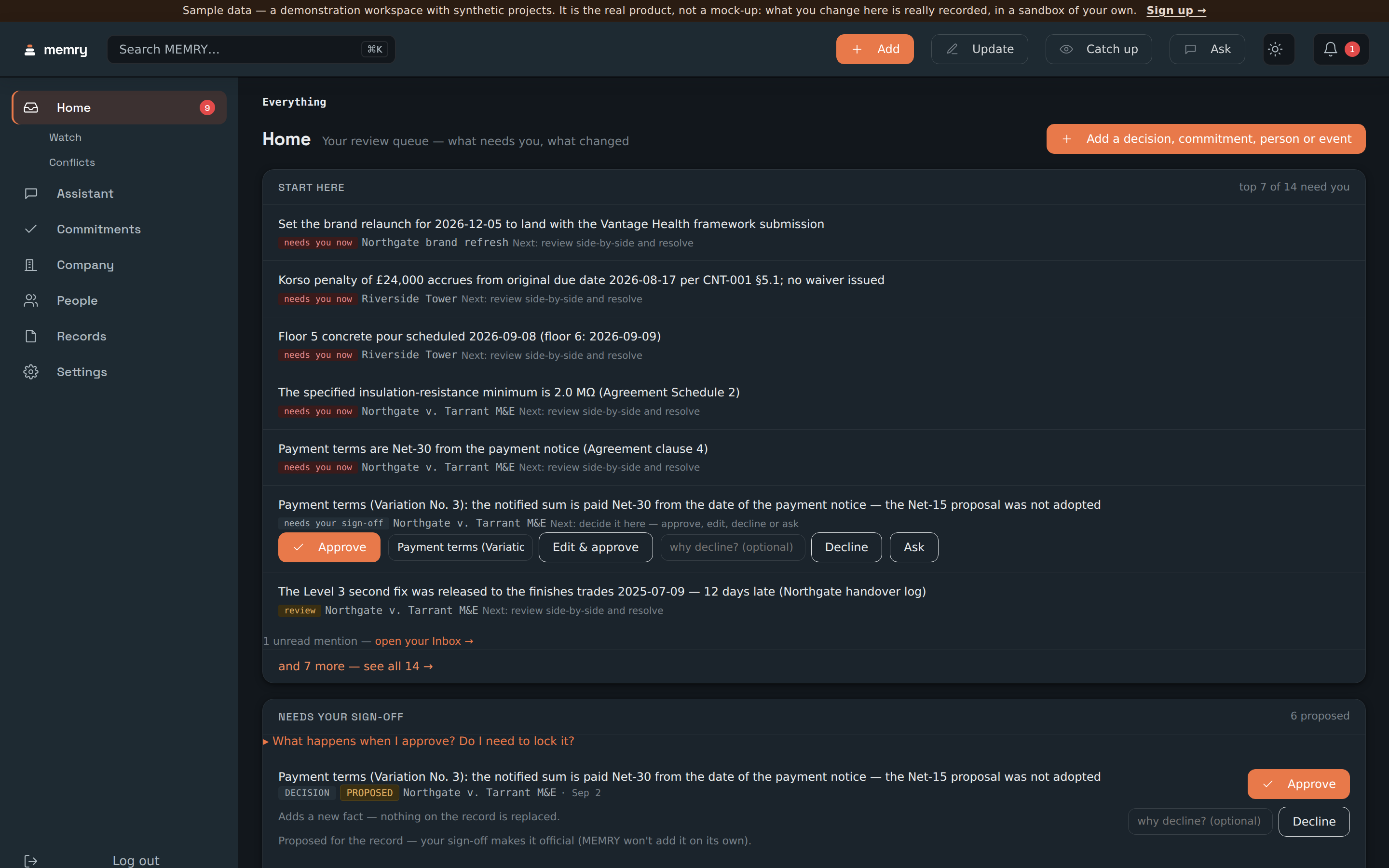
Memry's Home screen listing seven things that need a person, each naming the fact that clashes and the next step, above a sign-off band whose rows each offer approve, edit and approve, decline, or ask. Step two and three, on screen

The queue is the whole of steps two and three. Each row states what was found and what it clashes with; the band below it is where you approve, edit, decline or ask.

What it reads, and what it does with it

Three ways in, and they all end in the same queue rather than in three separate inboxes you have to keep.

Documents you upload

Drop a file in, or paste the text. Memry stores the body, reads it, and proposes what it found — each proposal keeping a reference back to the document and the sentence inside it. You can preview the extraction before anything is filed.

A connected mailbox

Mail can be read for the same things: the promise buried in the third paragraph, the date somebody changed in passing. What Memry keeps from a mailbox is deliberately narrow, and the security page states the rule in one sentence rather than in a policy.

What you type

A decision from a meeting, a person, a commitment somebody made on the phone. Added by hand, it goes through the same door and gets the same treatment as anything read out of a document.

And then: one queue

However it arrived, it lands in the same review queue, in the same shape, with the same four choices. There is one place to look, and it is the first screen.

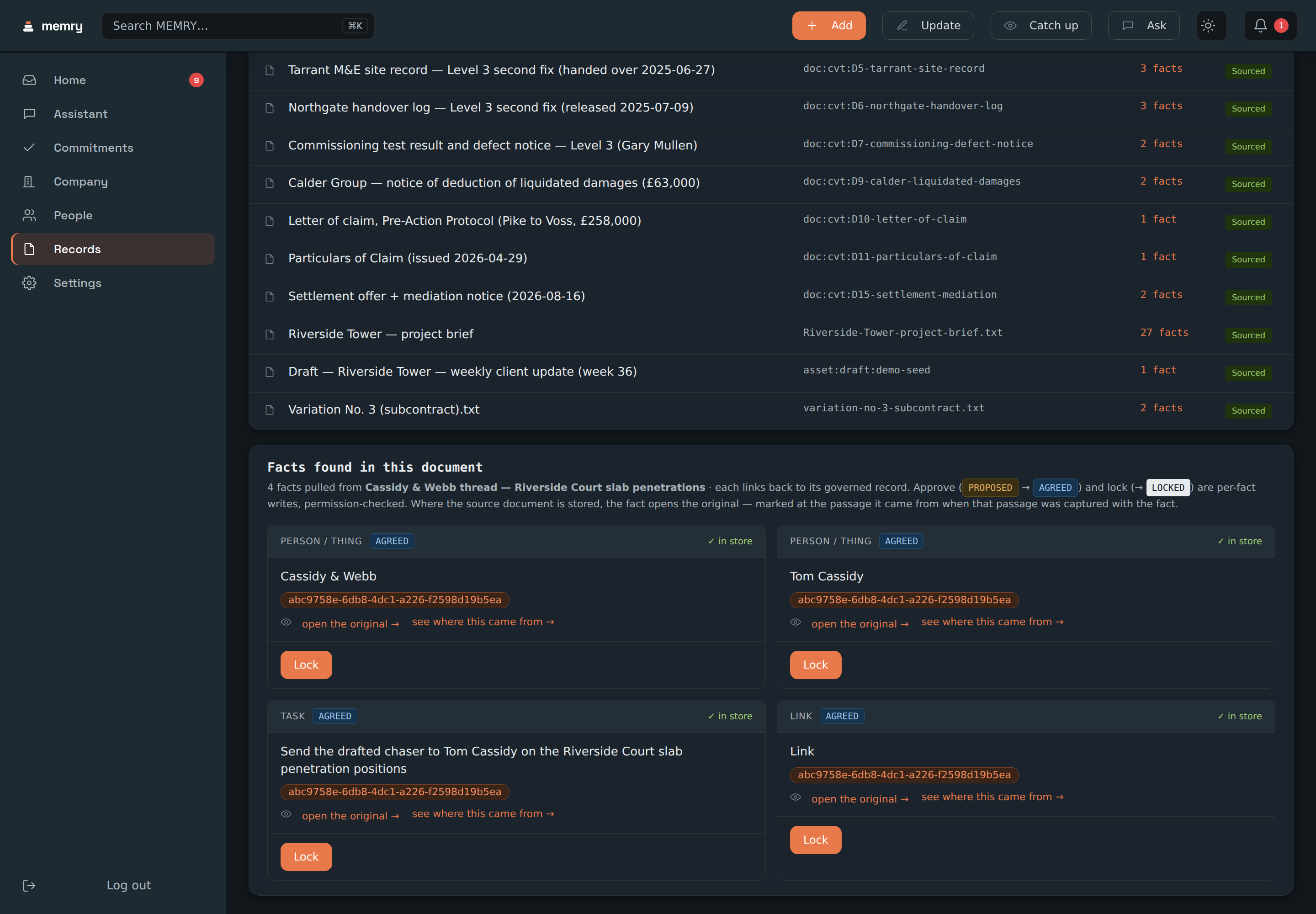
Memry's documents screen: a panel headed Facts found in this document, listing four facts read out of one message thread, each showing how settled it is, a link to open the exact source passage it came from, and a control to lock it. From the demo company

Four facts, read out of one thread. Each carries a link straight back to the sentence it came from, and settling one is a per-fact decision rather than a bulk import.

A receipt is the sentence, not a summary

This is the difference between a tool you can use in an argument and one you cannot.

Every fact Memry holds carries where it came from: which document, which passage, who approved it and when. Click the number and the document opens at the sentence — the actual words, highlighted, in the file somebody actually sent you.

It also carries how settled it is. A fact can be locked (someone signed it off and it cannot be quietly replaced), agreed (recorded and accepted), or proposed (found, and waiting for a person). You always know which of the three you are looking at, because the record says so on its face.

That is why a disagreement can be raised at all. A tool that keeps only the latest value has nothing to compare.

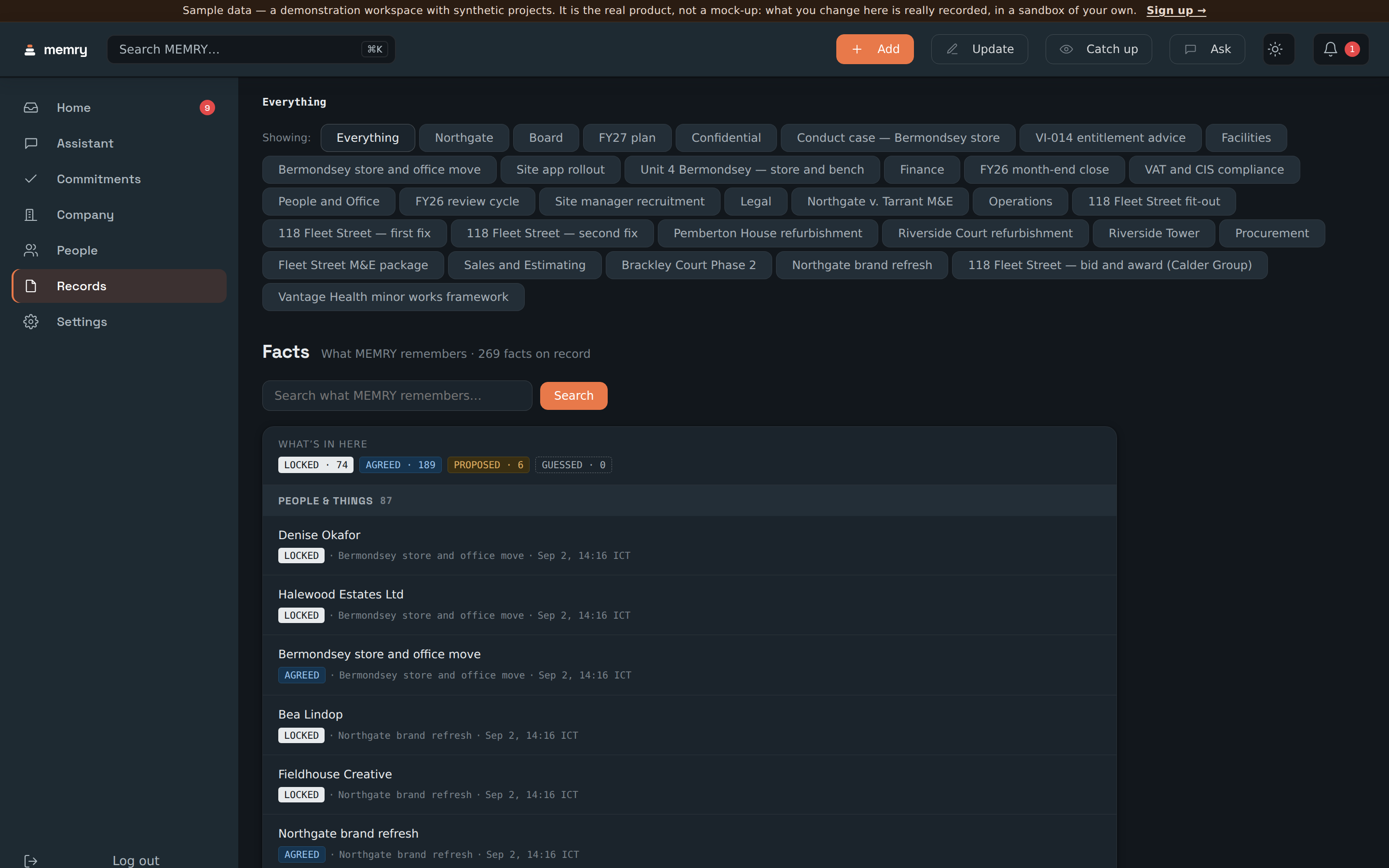
Memry's Facts screen showing 272 facts on record for the demo company, split by how settled each one is — 83 locked, 183 agreed, 6 proposed, none guessed — over a list where every row carries the project and date it came from. From the demo company

272 facts, and every one of them says how settled it is and where it came from.

When two things disagree, nobody gets overwritten

Not the point of the product — the guarantee underneath it. Everything else here is trustworthy because of this.

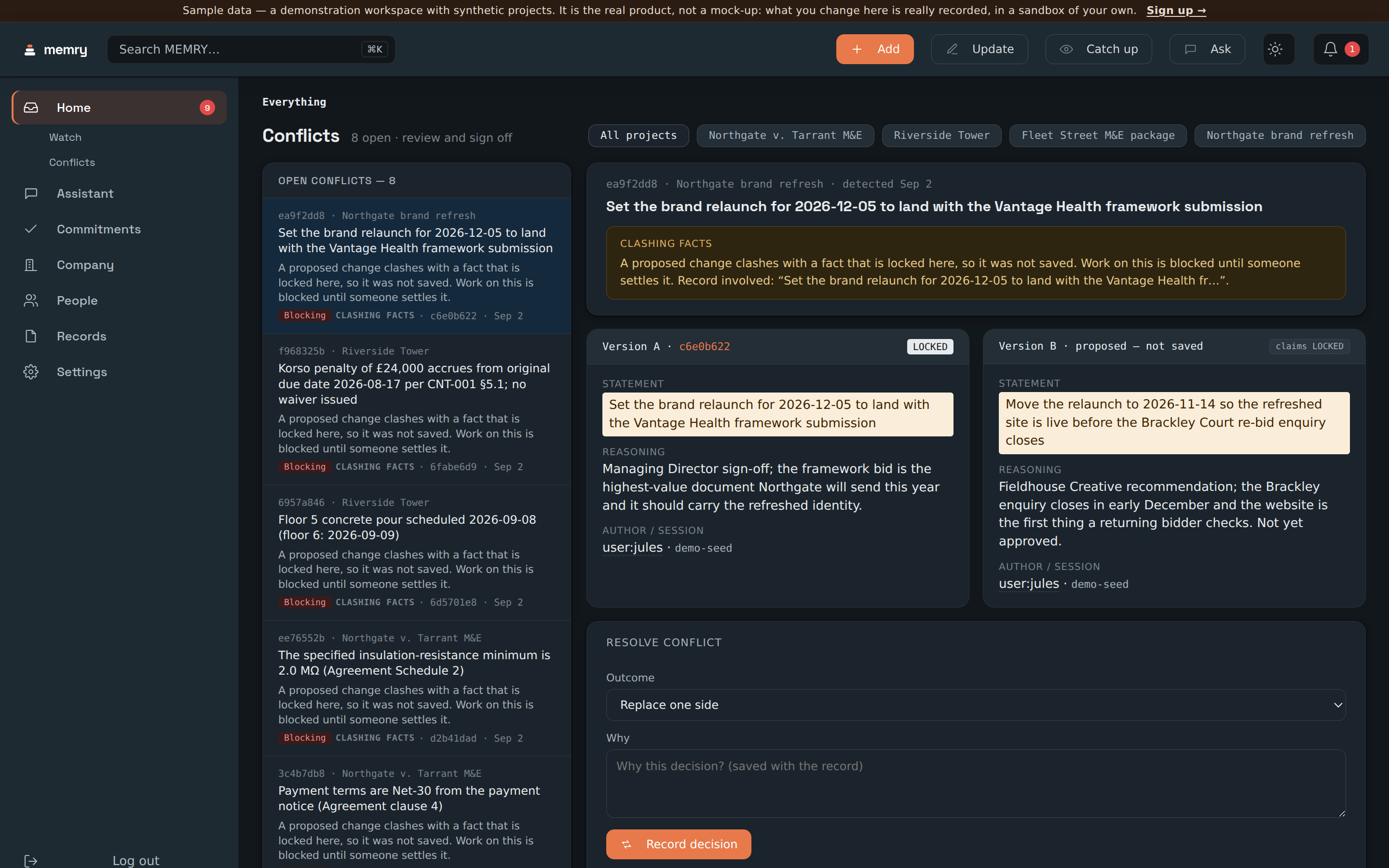
A new claim arrives that contradicts a fact somebody locked. Most tools take the newer value, because that is the easy thing to do and it never looks like a failure. Memry does not save it. It parks the newcomer, marks the work blocked, and puts both versions in front of a person, side by side.

You get each version's own words, its own reasoning, who recorded it and out of which document — and a form to settle it: replace one side, keep both, or record a decision about which governs and why. The answer goes into the record with the reason attached, so the next person does not re-litigate it.

The demo has eight of these open right now. Not staged for the tour — they fall out of a seeded company whose documents genuinely disagree with each other, the way a real one's do.
Two versions of the same fact shown side by side in Memry: the locked version that stands, next to a proposed version that was not saved because it clashes with it. Each carries its own reasoning and author, and a form below records which one settles it. From the demo company

Version A is locked and stands. Version B was proposed and not saved. Both keep their source, and the form below settles it.

Whose “on track” to believe

Not an opinion about who is reliable. A count of the dates each person actually called, against what actually happened.

It is arithmetic, not judgement

When someone gives a date and the thing later happens, that is one data point. Enough of them and Memry can show how that person's dates have tended to run — on schedule, or by some multiple of it.

Where there is no record, it says so

Most people in a new workspace read “no estimates yet”, and that is what they will say until they have called some dates. A score invented before there is anything to score it on would be worse than no score.

It surfaces where it matters

The mark travels with the person: it is on the task, on the watch list and on their row in the roster, so it is in front of you at the moment you are deciding whether to believe a date.

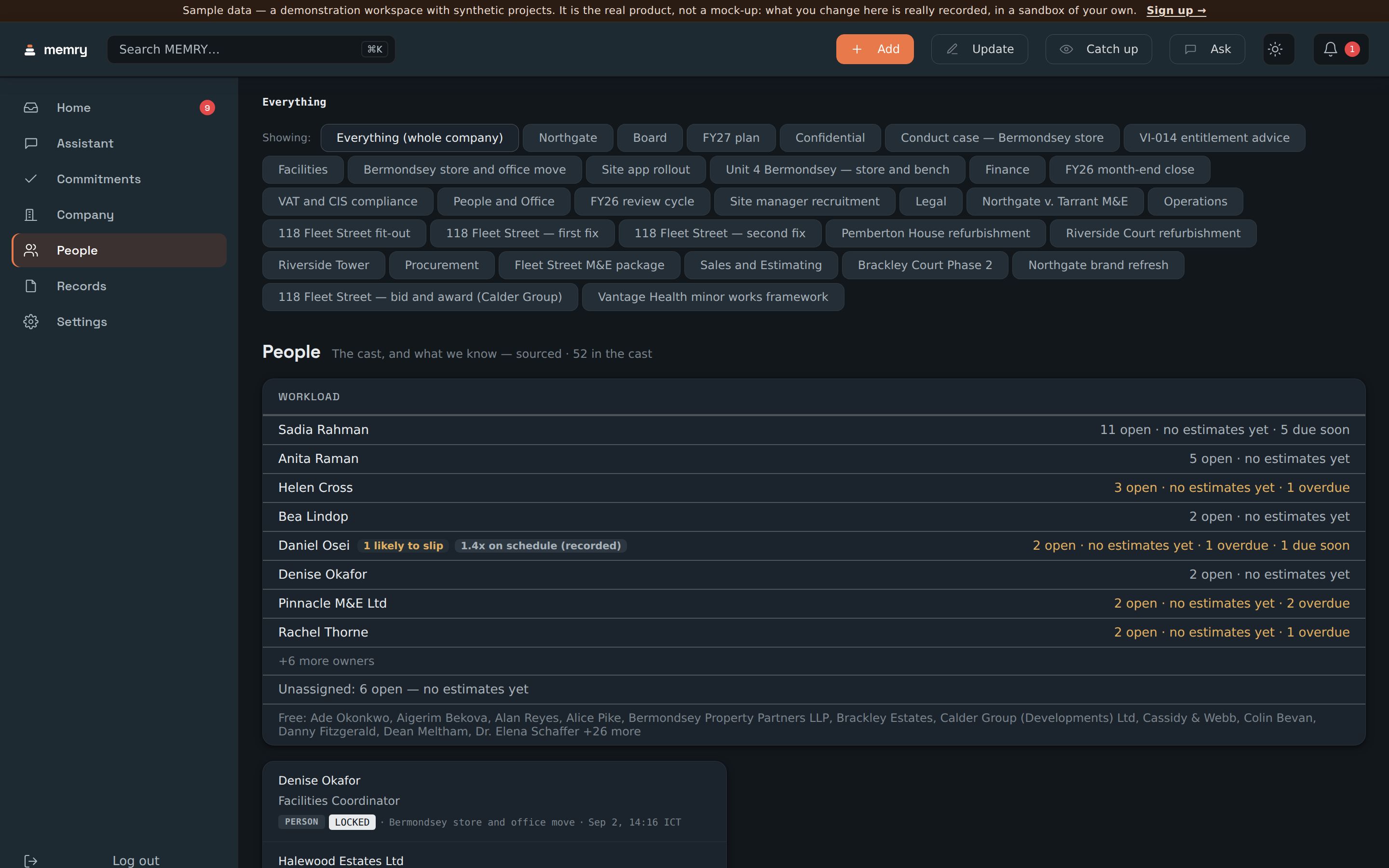
Memry's People screen for the demo company, listing who holds how much open work and how much of it is overdue, with a marker beside one name reading 1.4 times on schedule as recorded and a risk marker beside a supplier, while most rows read no estimates yet. From the demo company

Sixty-four people and firms. One carries a recorded 1.4x, one supplier is marked risky, and the rest honestly say they have no record yet.

What “it remembers” actually buys you

Memory is a claim every tool makes. Here is the specific, checkable version of it.

A full account of what changed

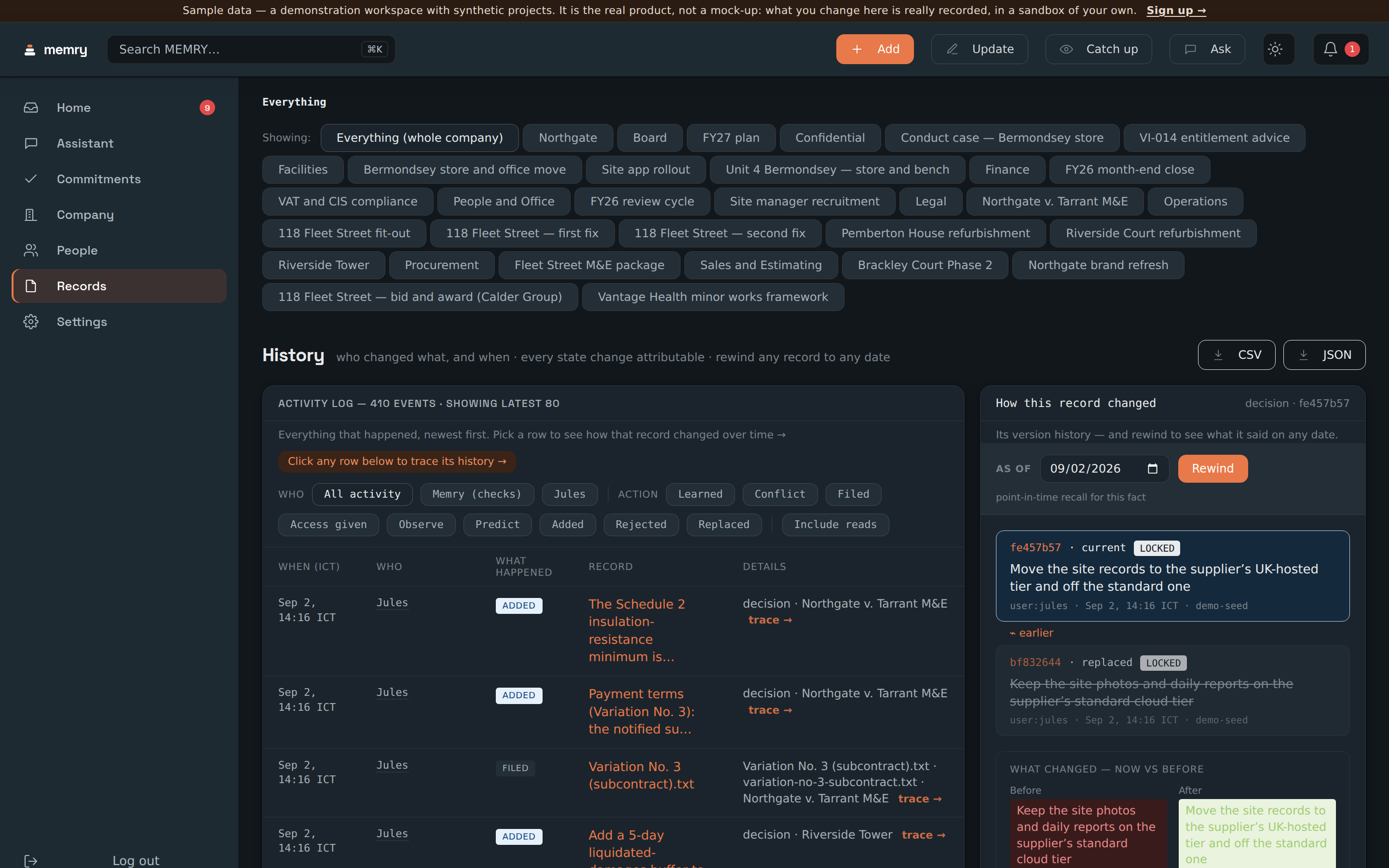
Every state change is attributable: who changed what, when, and off the back of which document. The demo workspace has several hundred of them after a single seeding, and you can filter by who did it or by what kind of change it was.

A record you can rewind

Pick a record and pick a date, and Memry shows you what it said on that date, with a before-and-after of the exact text that changed. This is per record. Rewinding the whole workspace at once is not built, and the product says so on the screen rather than implying otherwise.

A catch-up instead of an archaeology dig

Come back after a week and one screen tells you what moved: what was decided, what is still in flight, what is newly overdue. It is scoped to a project or to everything, and it is generated from the record rather than written by anybody.

And you can take it with you

The whole trail exports as CSV or JSON, from inside the product, without a support ticket and without a row cap. A memory you cannot get out of the tool is the tool's memory, not your company's.

Memry's History screen showing a filterable log of who changed what and when, with CSV and JSON download buttons, beside a panel that rewinds a single record to a chosen date and shows the text before and after the change. From the demo company

The log, the filters, the two export buttons, and the per-record rewind with its before-and-after.

What it does not do

A page that only lists strengths is a page you cannot calibrate. These are real limits, stated plainly — and where the next release is designed to close one, that is written down separately rather than blurred into this list.

It does not decide anything

Memry never resolves a disagreement for you and never records a fact you have not approved. If nobody looks at the queue, nothing enters the record. That is deliberate, and it is also a real cost: the loop needs a person in it.

It does not rewind the whole workspace

You can rewind one record to a date. Asking “what did the entire company look like last March” is not something it can answer today.

It cannot score somebody with no history

Reliability marks need past dates to measure. In a workspace's first months most people will have none, and the product will say so rather than guess.

It is only as good as what reaches it

A decision made on a call that nobody writes anywhere is a decision Memry does not have. It closes the gap between what was written and what was remembered — not the gap between what was said and what was written.

Reading about a loop is not watching one

Watch it run on a real company.

The demo opens on a company with the loop already run: a queue of things noticed, eight disagreements raised and waiting, and a full trail behind all of it. Change anything you like — it is your own copy.

Explore the demo No account. No invite code.